Özel Response - HTML, Stream, File ve Diğerleri
🌐 Translation by AI and humans
This translation was made by AI guided by humans. 🤝
It could have mistakes of misunderstanding the original meaning, or looking unnatural, etc. 🤖
You can improve this translation by helping us guide the AI LLM better.
Varsayılan olarak FastAPI, response'ları JSONResponse kullanarak döndürür.
Bunu, Doğrudan bir Response döndür bölümünde gördüğünüz gibi doğrudan bir Response döndürerek geçersiz kılabilirsiniz.
Ancak doğrudan bir Response döndürürseniz (veya JSONResponse gibi herhangi bir alt sınıfını), veri otomatik olarak dönüştürülmez (bir response_model tanımlamış olsanız bile) ve dokümantasyon da otomatik üretilmez (örneğin, üretilen OpenAPI’nin parçası olarak HTTP header Content-Type içindeki ilgili "media type" dahil edilmez).
Bununla birlikte, path operation decorator içinde response_class parametresini kullanarak hangi Response’un (örn. herhangi bir Response alt sınıfı) kullanılacağını da ilan edebilirsiniz.
path operation function’ınızdan döndürdüğünüz içerik, o Response’un içine yerleştirilir.
Ve eğer bu Response ( JSONResponse ve UJSONResponse’ta olduğu gibi) bir JSON media type’a (application/json) sahipse, döndürdüğünüz veri; path operation decorator içinde tanımladığınız herhangi bir Pydantic response_model ile otomatik olarak dönüştürülür (ve filtrelenir).
Not
Media type’ı olmayan bir response class kullanırsanız, FastAPI response’unuzun content içermediğini varsayar; bu yüzden ürettiği OpenAPI dokümanında response formatını dokümante etmez.
ORJSONResponse Kullan
Örneğin performansı sıkıştırmaya çalışıyorsanız, orjson kurup kullanabilir ve response’u ORJSONResponse olarak ayarlayabilirsiniz.
Kullanmak istediğiniz Response class’ını (alt sınıfını) import edin ve path operation decorator içinde tanımlayın.
Büyük response'larda, doğrudan bir Response döndürmek bir dictionary döndürmekten çok daha hızlıdır.
Çünkü varsayılan olarak FastAPI, içindeki her item’ı inceleyip JSON olarak serialize edilebilir olduğundan emin olur; tutorial’da anlatılan aynı JSON Compatible Encoder mekanizmasını kullanır. Bu da örneğin veritabanı modelleri gibi keyfi objeleri döndürebilmenizi sağlar.
Ancak döndürdüğünüz içeriğin JSON ile serialize edilebilir olduğundan eminseniz, onu doğrudan response class’ına verebilir ve FastAPI’nin response class’ına vermeden önce dönüş içeriğinizi jsonable_encoder içinden geçirirken oluşturacağı ek yükten kaçınabilirsiniz.
from fastapi import FastAPI
from fastapi.responses import ORJSONResponse

app = FastAPI()


@app.get("/items/", response_class=ORJSONResponse)
async def read_items():
    return ORJSONResponse([{"item_id": "Foo"}])
Bilgi
response_class parametresi, response’un "media type"’ını tanımlamak için de kullanılır.
Bu durumda HTTP header Content-Type, application/json olarak ayarlanır.
Ve OpenAPI’de de bu şekilde dokümante edilir.
İpucu
ORJSONResponse yalnızca FastAPI’de vardır, Starlette’te yoktur.
HTML Response
FastAPI’den doğrudan HTML içeren bir response döndürmek için HTMLResponse kullanın.
HTMLResponseimport edin.- path operation decorator’ınızın
response_classparametresi olarakHTMLResponseverin.
from fastapi import FastAPI
from fastapi.responses import HTMLResponse

app = FastAPI()


@app.get("/items/", response_class=HTMLResponse)
async def read_items():
    return """
    <html>
        <head>
            <title>Some HTML in here</title>
        </head>
        <body>
            <h1>Look ma! HTML!</h1>
        </body>
    </html>
    """
Bilgi
response_class parametresi, response’un "media type"’ını tanımlamak için de kullanılır.
Bu durumda HTTP header Content-Type, text/html olarak ayarlanır.
Ve OpenAPI’de de bu şekilde dokümante edilir.
Bir Response Döndür
Doğrudan bir Response döndür bölümünde görüldüğü gibi, path operation içinde doğrudan bir response döndürerek response’u override edebilirsiniz.
Yukarıdaki örneğin aynısı, bu sefer bir HTMLResponse döndürerek, şöyle görünebilir:
from fastapi import FastAPI
from fastapi.responses import HTMLResponse

app = FastAPI()


@app.get("/items/")
async def read_items():
    html_content = """
    <html>
        <head>
            <title>Some HTML in here</title>
        </head>
        <body>
            <h1>Look ma! HTML!</h1>
        </body>
    </html>
    """
    return HTMLResponse(content=html_content, status_code=200)
Uyarı
path operation function’ınızın doğrudan döndürdüğü bir Response, OpenAPI’de dokümante edilmez (örneğin Content-Type dokümante edilmez) ve otomatik interaktif dokümanlarda görünmez.
Bilgi
Elbette gerçek Content-Type header’ı, status code vb. değerler, döndürdüğünüz Response objesinden gelir.
OpenAPI’de Dokümante Et ve Response’u Override Et
Response’u fonksiyonun içinden override etmek ama aynı zamanda OpenAPI’de "media type"’ı dokümante etmek istiyorsanız, response_class parametresini kullanıp ayrıca bir Response objesi döndürebilirsiniz.
Bu durumda response_class sadece OpenAPI path operation’ını dokümante etmek için kullanılır; sizin Response’unuz ise olduğu gibi kullanılır.
Doğrudan bir HTMLResponse Döndür
Örneğin şöyle bir şey olabilir:
from fastapi import FastAPI
from fastapi.responses import HTMLResponse

app = FastAPI()


def generate_html_response():
    html_content = """
    <html>
        <head>
            <title>Some HTML in here</title>
        </head>
        <body>
            <h1>Look ma! HTML!</h1>
        </body>
    </html>
    """
    return HTMLResponse(content=html_content, status_code=200)


@app.get("/items/", response_class=HTMLResponse)
async def read_items():
    return generate_html_response()
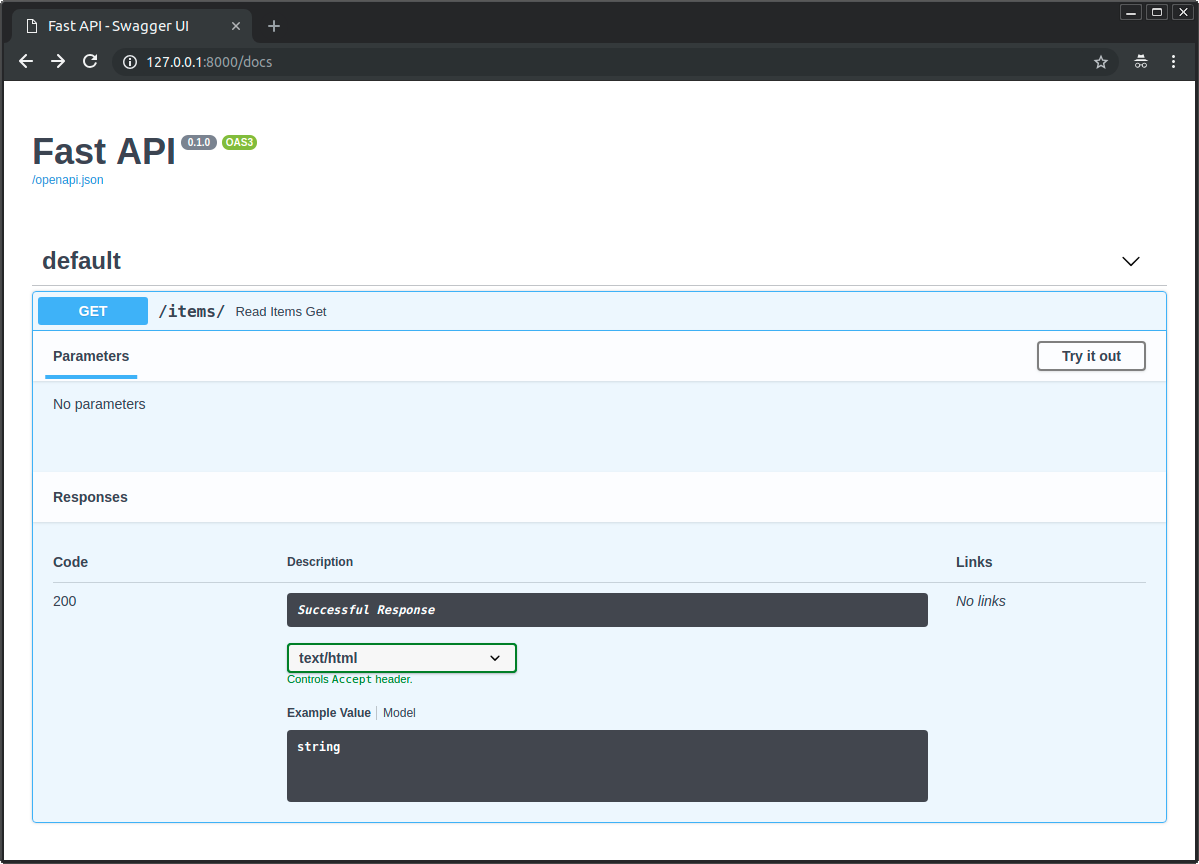
Bu örnekte generate_html_response() fonksiyonu, HTML’i bir str olarak döndürmek yerine zaten bir Response üretip döndürmektedir.
generate_html_response() çağrısının sonucunu döndürerek, varsayılan FastAPI davranışını override edecek bir Response döndürmüş olursunuz.
Ama response_class içinde HTMLResponse da verdiğiniz için FastAPI, bunu OpenAPI’de ve interaktif dokümanlarda text/html ile HTML olarak nasıl dokümante edeceğini bilir:
Mevcut Response'lar
Mevcut response'lardan bazıları aşağıdadır.
Unutmayın: Response ile başka herhangi bir şeyi döndürebilir, hatta özel bir alt sınıf da oluşturabilirsiniz.
Teknik Detaylar
from starlette.responses import HTMLResponse da kullanabilirsiniz.
FastAPI, geliştirici için kolaylık olsun diye starlette.responses içindekileri fastapi.responses olarak da sağlar. Ancak mevcut response'ların çoğu doğrudan Starlette’ten gelir.
Response
Ana Response class’ıdır; diğer tüm response'lar bundan türetilir.
Bunu doğrudan döndürebilirsiniz.
Şu parametreleri kabul eder:
content- Birstrveyabytes.status_code- BirintHTTP status code.headers- String’lerden oluşan birdict.media_type- Media type’ı veren birstr. Örn."text/html".
FastAPI (aslında Starlette) otomatik olarak bir Content-Length header’ı ekler. Ayrıca media_type’a göre bir Content-Type header’ı ekler ve text türleri için sona bir charset ekler.
from fastapi import FastAPI, Response

app = FastAPI()


@app.get("/legacy/")
def get_legacy_data():
    data = """<?xml version="1.0"?>
    <shampoo>
    <Header>
        Apply shampoo here.
    </Header>
    <Body>
        You'll have to use soap here.
    </Body>
    </shampoo>
    """
    return Response(content=data, media_type="application/xml")
HTMLResponse
Yukarıda okuduğunuz gibi, bir miktar text veya bytes alır ve HTML response döndürür.
PlainTextResponse
Bir miktar text veya bytes alır ve düz metin response döndürür.
from fastapi import FastAPI
from fastapi.responses import PlainTextResponse

app = FastAPI()


@app.get("/", response_class=PlainTextResponse)
async def main():
    return "Hello World"
JSONResponse
Bir miktar veri alır ve application/json olarak encode edilmiş bir response döndürür.
Yukarıda okuduğunuz gibi, FastAPI’de varsayılan response budur.
ORJSONResponse
Yukarıda okuduğunuz gibi orjson kullanan hızlı bir alternatif JSON response.
Bilgi
Bunun için orjson kurulmalıdır; örneğin pip install orjson.
UJSONResponse
ujson kullanan alternatif bir JSON response.
Bilgi
Bunun için ujson kurulmalıdır; örneğin pip install ujson.
Uyarı
ujson, bazı edge-case’leri ele alma konusunda Python’un built-in implementasyonu kadar dikkatli değildir.
from fastapi import FastAPI
from fastapi.responses import UJSONResponse

app = FastAPI()


@app.get("/items/", response_class=UJSONResponse)
async def read_items():
    return [{"item_id": "Foo"}]
İpucu
ORJSONResponse daha hızlı bir alternatif olabilir.
RedirectResponse
HTTP redirect döndürür. Varsayılan olarak 307 status code (Temporary Redirect) kullanır.
RedirectResponse’u doğrudan döndürebilirsiniz:
from fastapi import FastAPI
from fastapi.responses import RedirectResponse

app = FastAPI()


@app.get("/typer")
async def redirect_typer():
    return RedirectResponse("https://typer.tiangolo.com")
Veya response_class parametresi içinde kullanabilirsiniz:
from fastapi import FastAPI
from fastapi.responses import RedirectResponse

app = FastAPI()


@app.get("/fastapi", response_class=RedirectResponse)
async def redirect_fastapi():
    return "https://fastapi.tiangolo.com"
Bunu yaparsanız, path operation function’ınızdan doğrudan URL döndürebilirsiniz.
Bu durumda kullanılan status_code, RedirectResponse için varsayılan olan 307 olur.
Ayrıca status_code parametresini response_class parametresiyle birlikte kullanabilirsiniz:
from fastapi import FastAPI
from fastapi.responses import RedirectResponse

app = FastAPI()


@app.get("/pydantic", response_class=RedirectResponse, status_code=302)
async def redirect_pydantic():
    return "https://docs.pydantic.dev/"
StreamingResponse
Bir async generator veya normal generator/iterator alır ve response body’yi stream eder.
from fastapi import FastAPI
from fastapi.responses import StreamingResponse

app = FastAPI()


async def fake_video_streamer():
    for i in range(10):
        yield b"some fake video bytes"


@app.get("/")
async def main():
    return StreamingResponse(fake_video_streamer())
StreamingResponse’u file-like objelerle kullanma
Bir file-like objeniz varsa (örn. open()’ın döndürdüğü obje), o file-like obje üzerinde iterate eden bir generator function oluşturabilirsiniz.
Böylece önce hepsini memory’ye okumak zorunda kalmazsınız; bu generator function’ı StreamingResponse’a verip döndürebilirsiniz.
Buna cloud storage ile etkileşime giren, video işleyen ve benzeri birçok kütüphane dahildir.
from fastapi import FastAPI
from fastapi.responses import StreamingResponse

some_file_path = "large-video-file.mp4"
app = FastAPI()


@app.get("/")
def main():
    def iterfile():  # (1)
        with open(some_file_path, mode="rb") as file_like:  # (2)
            yield from file_like  # (3)

    return StreamingResponse(iterfile(), media_type="video/mp4")
- Bu generator function’dır. İçinde
yieldifadeleri olduğu için "generator function" denir. - Bir
withbloğu kullanarak, generator function bittiğinde file-like objenin kapandığından emin oluruz. Yani response göndermeyi bitirdikten sonra kapanır. -
Bu
yield from, fonksiyonafile_likeisimli şeyi iterate etmesini söyler. Ardından iterate edilen her parça için, o parçayı bu generator function’dan (iterfile) geliyormuş gibi yield eder.Yani, içerdeki "üretme" (generating) işini başka bir şeye devreden bir generator function’dır.
Bunu bu şekilde yaptığımızda
withbloğu içinde tutabilir ve böylece iş bitince file-like objenin kapanmasını garanti edebiliriz.
İpucu
Burada async ve await desteklemeyen standart open() kullandığımız için path operation’ı normal def ile tanımlarız.
FileResponse
Asenkron olarak bir dosyayı response olarak stream eder.
Diğer response türlerine göre instantiate ederken farklı argümanlar alır:
path- Stream edilecek dosyanın dosya path'i.headers- Eklenecek özel header’lar; dictionary olarak.media_type- Media type’ı veren string. Ayarlanmazsa, dosya adı veya path kullanılarak media type tahmin edilir.filename- Ayarlanırsa response içindekiContent-Disposition’a dahil edilir.
File response'ları uygun Content-Length, Last-Modified ve ETag header’larını içerir.
from fastapi import FastAPI
from fastapi.responses import FileResponse

some_file_path = "large-video-file.mp4"
app = FastAPI()


@app.get("/")
async def main():
    return FileResponse(some_file_path)
response_class parametresini de kullanabilirsiniz:
from fastapi import FastAPI
from fastapi.responses import FileResponse

some_file_path = "large-video-file.mp4"
app = FastAPI()


@app.get("/", response_class=FileResponse)
async def main():
    return some_file_path
Bu durumda path operation function’ınızdan doğrudan dosya path'ini döndürebilirsiniz.
Özel response class
Response’dan türeterek kendi özel response class’ınızı oluşturabilir ve kullanabilirsiniz.
Örneğin, dahil gelen ORJSONResponse class’ında kullanılmayan bazı özel ayarlarla orjson kullanmak istediğinizi varsayalım.
Diyelim ki girintili ve biçimlendirilmiş JSON döndürmek istiyorsunuz; bunun için orjson.OPT_INDENT_2 seçeneğini kullanmak istiyorsunuz.
Bir CustomORJSONResponse oluşturabilirsiniz. Burada yapmanız gereken temel şey, content’i bytes olarak döndüren bir Response.render(content) metodu yazmaktır:
from typing import Any

import orjson
from fastapi import FastAPI, Response

app = FastAPI()


class CustomORJSONResponse(Response):
    media_type = "application/json"

    def render(self, content: Any) -> bytes:
        assert orjson is not None, "orjson must be installed"
        return orjson.dumps(content, option=orjson.OPT_INDENT_2)


@app.get("/", response_class=CustomORJSONResponse)
async def main():
    return {"message": "Hello World"}
Artık şunu döndürmek yerine:
{"message": "Hello World"}
...bu response şunu döndürür:
{
  "message": "Hello World"
}
Elbette JSON’u formatlamaktan çok daha iyi şekillerde bundan faydalanabilirsiniz. 😉
Varsayılan response class
Bir FastAPI class instance’ı veya bir APIRouter oluştururken, varsayılan olarak hangi response class’ının kullanılacağını belirtebilirsiniz.
Bunu tanımlayan parametre default_response_class’tır.
Aşağıdaki örnekte FastAPI, tüm path operations için varsayılan olarak JSONResponse yerine ORJSONResponse kullanır.
from fastapi import FastAPI
from fastapi.responses import ORJSONResponse

app = FastAPI(default_response_class=ORJSONResponse)


@app.get("/items/")
async def read_items():
    return [{"item_id": "Foo"}]
İpucu
Daha önce olduğu gibi, path operations içinde response_class’ı yine override edebilirsiniz.
Ek dokümantasyon
OpenAPI’de media type’ı ve daha birçok detayı responses kullanarak da tanımlayabilirsiniz: OpenAPI’de Ek Response'lar.