OpenAPI'de Ek Response'lar
🌐 Translation by AI and humans
This translation was made by AI guided by humans. 🤝
It could have mistakes of misunderstanding the original meaning, or looking unnatural, etc. 🤖
You can improve this translation by helping us guide the AI LLM better.
Uyarı
Bu konu oldukça ileri seviye bir konudur.
FastAPI'ye yeni başlıyorsanız buna ihtiyaç duymayabilirsiniz.
Ek status code'lar, media type'lar, açıklamalar vb. ile ek response'lar tanımlayabilirsiniz.
Bu ek response'lar OpenAPI şemasına dahil edilir; dolayısıyla API dokümanlarında da görünürler.
Ancak bu ek response'lar için, status code'unuzu ve içeriğinizi vererek JSONResponse gibi bir Response'u doğrudan döndürdüğünüzden emin olmanız gerekir.
model ile Ek Response
Path operation decorator'larınıza responses adlı bir parametre geçebilirsiniz.
Bu parametre bir dict alır: anahtarlar her response için status code'lardır (200 gibi), değerler ise her birine ait bilgileri içeren başka dict'lerdir.
Bu response dict'lerinin her birinde, response_model'e benzer şekilde bir Pydantic model içeren model anahtarı olabilir.
FastAPI bu modeli alır, JSON Schema'sını üretir ve OpenAPI'de doğru yere ekler.
Örneğin, 404 status code'u ve Message Pydantic model'i ile başka bir response tanımlamak için şunu yazabilirsiniz:
from fastapi import FastAPI
from fastapi.responses import JSONResponse
from pydantic import BaseModel


class Item(BaseModel):
    id: str
    value: str


class Message(BaseModel):
    message: str


app = FastAPI()


@app.get("/items/{item_id}", response_model=Item, responses={404: {"model": Message}})
async def read_item(item_id: str):
    if item_id == "foo":
        return {"id": "foo", "value": "there goes my hero"}
    return JSONResponse(status_code=404, content={"message": "Item not found"})
Not
JSONResponse'u doğrudan döndürmeniz gerektiğini unutmayın.
Bilgi
model anahtarı OpenAPI'nin bir parçası değildir.
FastAPI buradaki Pydantic model'i alır, JSON Schema'yı üretir ve doğru yere yerleştirir.
Doğru yer şurasıdır:
- Değeri başka bir JSON nesnesi (
dict) olancontentanahtarının içinde:- Media type anahtarı (örn.
application/json) bulunur; bunun değeri başka bir JSON nesnesidir ve onun içinde:- Değeri model'den gelen JSON Schema olan
schemaanahtarı vardır; doğru yer burasıdır.- FastAPI bunu doğrudan gömmek yerine OpenAPI'deki başka bir yerde bulunan global JSON Schema'lara bir referans ekler. Böylece diğer uygulamalar ve client'lar bu JSON Schema'ları doğrudan kullanabilir, daha iyi code generation araçları sağlayabilir, vb.
- Değeri model'den gelen JSON Schema olan
- Media type anahtarı (örn.
Bu path operation için OpenAPI'de üretilen response'lar şöyle olur:
{
    "responses": {
        "404": {
            "description": "Additional Response",
            "content": {
                "application/json": {
                    "schema": {
                        "$ref": "#/components/schemas/Message"
                    }
                }
            }
        },
        "200": {
            "description": "Successful Response",
            "content": {
                "application/json": {
                    "schema": {
                        "$ref": "#/components/schemas/Item"
                    }
                }
            }
        },
        "422": {
            "description": "Validation Error",
            "content": {
                "application/json": {
                    "schema": {
                        "$ref": "#/components/schemas/HTTPValidationError"
                    }
                }
            }
        }
    }
}
Schema'lar OpenAPI şemasının içinde başka bir yere referanslanır:
{
    "components": {
        "schemas": {
            "Message": {
                "title": "Message",
                "required": [
                    "message"
                ],
                "type": "object",
                "properties": {
                    "message": {
                        "title": "Message",
                        "type": "string"
                    }
                }
            },
            "Item": {
                "title": "Item",
                "required": [
                    "id",
                    "value"
                ],
                "type": "object",
                "properties": {
                    "id": {
                        "title": "Id",
                        "type": "string"
                    },
                    "value": {
                        "title": "Value",
                        "type": "string"
                    }
                }
            },
            "ValidationError": {
                "title": "ValidationError",
                "required": [
                    "loc",
                    "msg",
                    "type"
                ],
                "type": "object",
                "properties": {
                    "loc": {
                        "title": "Location",
                        "type": "array",
                        "items": {
                            "type": "string"
                        }
                    },
                    "msg": {
                        "title": "Message",
                        "type": "string"
                    },
                    "type": {
                        "title": "Error Type",
                        "type": "string"
                    }
                }
            },
            "HTTPValidationError": {
                "title": "HTTPValidationError",
                "type": "object",
                "properties": {
                    "detail": {
                        "title": "Detail",
                        "type": "array",
                        "items": {
                            "$ref": "#/components/schemas/ValidationError"
                        }
                    }
                }
            }
        }
    }
}
Ana Response İçin Ek Media Type'lar
Aynı responses parametresini, aynı ana response için farklı media type'lar eklemek amacıyla da kullanabilirsiniz.
Örneğin, image/png için ek bir media type ekleyerek, path operation'ınızın bir JSON nesnesi (media type application/json) ya da bir PNG görseli döndürebildiğini belirtebilirsiniz:
from fastapi import FastAPI
from fastapi.responses import FileResponse
from pydantic import BaseModel


class Item(BaseModel):
    id: str
    value: str


app = FastAPI()


@app.get(
    "/items/{item_id}",
    response_model=Item,
    responses={
        200: {
            "content": {"image/png": {}},
            "description": "Return the JSON item or an image.",
        }
    },
)
async def read_item(item_id: str, img: bool | None = None):
    if img:
        return FileResponse("image.png", media_type="image/png")
    else:
        return {"id": "foo", "value": "there goes my hero"}
🤓 Other versions and variants
from typing import Union

from fastapi import FastAPI
from fastapi.responses import FileResponse
from pydantic import BaseModel


class Item(BaseModel):
    id: str
    value: str


app = FastAPI()


@app.get(
    "/items/{item_id}",
    response_model=Item,
    responses={
        200: {
            "content": {"image/png": {}},
            "description": "Return the JSON item or an image.",
        }
    },
)
async def read_item(item_id: str, img: Union[bool, None] = None):
    if img:
        return FileResponse("image.png", media_type="image/png")
    else:
        return {"id": "foo", "value": "there goes my hero"}
Not
Görseli FileResponse kullanarak doğrudan döndürmeniz gerektiğine dikkat edin.
Bilgi
responses parametrenizde açıkça farklı bir media type belirtmediğiniz sürece FastAPI, response'un ana response class'ı ile aynı media type'a sahip olduğunu varsayar (varsayılan application/json).
Ancak media type'ı None olan özel bir response class belirttiyseniz, FastAPI ilişkili bir model'i olan tüm ek response'lar için application/json kullanır.
Bilgileri Birleştirme
response_model, status_code ve responses parametreleri dahil olmak üzere, response bilgilerini birden fazla yerden birleştirebilirsiniz.
Varsayılan 200 status code'unu (ya da gerekiyorsa özel bir tane) kullanarak bir response_model tanımlayabilir, ardından aynı response için ek bilgileri responses içinde, doğrudan OpenAPI şemasına ekleyebilirsiniz.
FastAPI, responses içindeki ek bilgileri korur ve model'inizin JSON Schema'sı ile birleştirir.
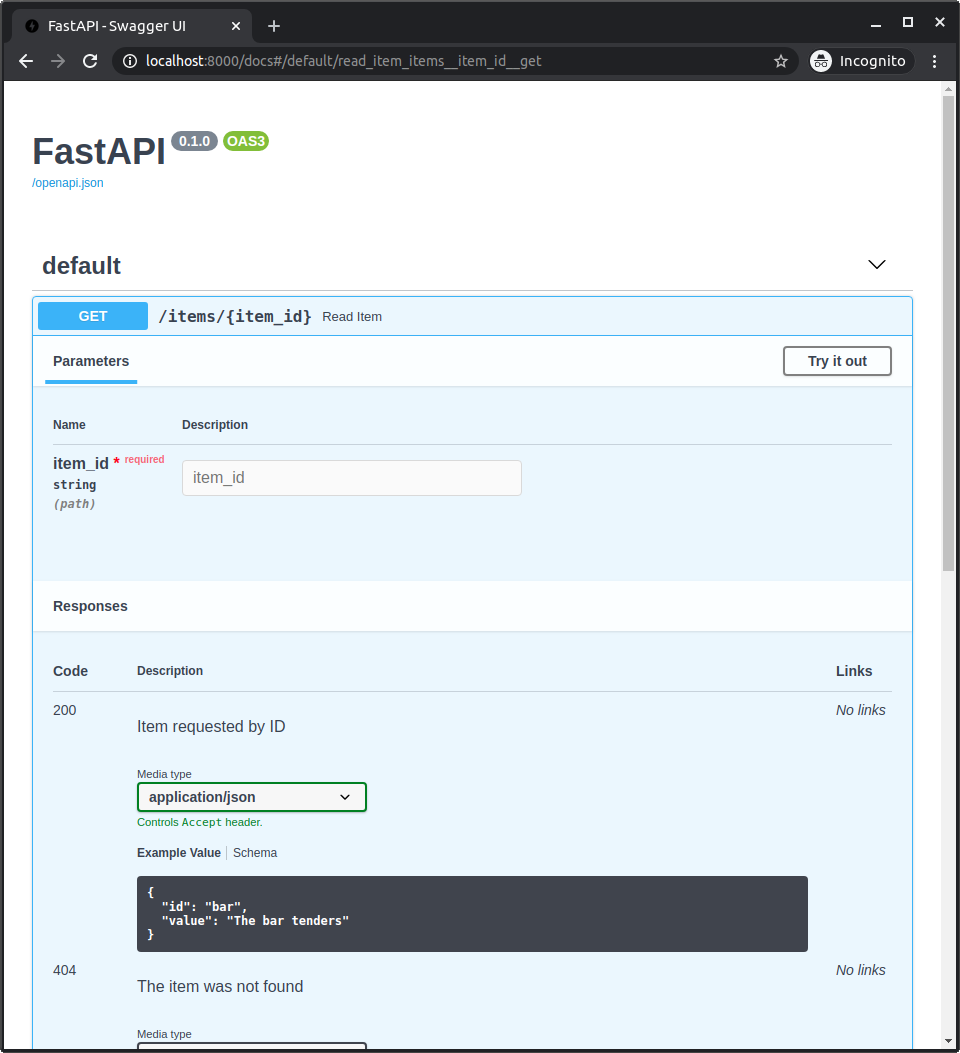
Örneğin, Pydantic model kullanan ve özel bir description içeren 404 status code'lu bir response tanımlayabilirsiniz.
Ayrıca response_model'inizi kullanan, ancak özel bir example içeren 200 status code'lu bir response da tanımlayabilirsiniz:
from fastapi import FastAPI
from fastapi.responses import JSONResponse
from pydantic import BaseModel


class Item(BaseModel):
    id: str
    value: str


class Message(BaseModel):
    message: str


app = FastAPI()


@app.get(
    "/items/{item_id}",
    response_model=Item,
    responses={
        404: {"model": Message, "description": "The item was not found"},
        200: {
            "description": "Item requested by ID",
            "content": {
                "application/json": {
                    "example": {"id": "bar", "value": "The bar tenders"}
                }
            },
        },
    },
)
async def read_item(item_id: str):
    if item_id == "foo":
        return {"id": "foo", "value": "there goes my hero"}
    else:
        return JSONResponse(status_code=404, content={"message": "Item not found"})
Bunların hepsi OpenAPI'nize birleştirilerek dahil edilir ve API dokümanlarında gösterilir:
Ön Tanımlı Response'ları Özel Olanlarla Birleştirme
Birçok path operation için geçerli olacak bazı ön tanımlı response'larınız olabilir; ancak bunları her path operation'ın ihtiyaç duyduğu özel response'larla birleştirmek isteyebilirsiniz.
Bu durumlarda, Python'daki bir dict'i **dict_to_unpack ile "unpacking" tekniğini kullanabilirsiniz:
old_dict = {
    "old key": "old value",
    "second old key": "second old value",
}
new_dict = {**old_dict, "new key": "new value"}
Burada new_dict, old_dict içindeki tüm key-value çiftlerini ve buna ek olarak yeni key-value çiftini içerir:
{
    "old key": "old value",
    "second old key": "second old value",
    "new key": "new value",
}
Bu tekniği, path operation'larınızda bazı ön tanımlı response'ları yeniden kullanmak ve bunları ek özel response'larla birleştirmek için kullanabilirsiniz.
Örneğin:
from fastapi import FastAPI
from fastapi.responses import FileResponse
from pydantic import BaseModel


class Item(BaseModel):
    id: str
    value: str


responses = {
    404: {"description": "Item not found"},
    302: {"description": "The item was moved"},
    403: {"description": "Not enough privileges"},
}


app = FastAPI()


@app.get(
    "/items/{item_id}",
    response_model=Item,
    responses={**responses, 200: {"content": {"image/png": {}}}},
)
async def read_item(item_id: str, img: bool | None = None):
    if img:
        return FileResponse("image.png", media_type="image/png")
    else:
        return {"id": "foo", "value": "there goes my hero"}
🤓 Other versions and variants
from typing import Union

from fastapi import FastAPI
from fastapi.responses import FileResponse
from pydantic import BaseModel


class Item(BaseModel):
    id: str
    value: str


responses = {
    404: {"description": "Item not found"},
    302: {"description": "The item was moved"},
    403: {"description": "Not enough privileges"},
}


app = FastAPI()


@app.get(
    "/items/{item_id}",
    response_model=Item,
    responses={**responses, 200: {"content": {"image/png": {}}}},
)
async def read_item(item_id: str, img: Union[bool, None] = None):
    if img:
        return FileResponse("image.png", media_type="image/png")
    else:
        return {"id": "foo", "value": "there goes my hero"}
OpenAPI Response'ları Hakkında Daha Fazla Bilgi
Response'ların içine tam olarak neleri dahil edebileceğinizi görmek için OpenAPI spesifikasyonundaki şu bölümlere bakabilirsiniz:
- OpenAPI Responses Object,
Response Object'i içerir. - OpenAPI Response Object, buradaki her şeyi
responsesparametreniz içinde, her bir response'un içine doğrudan ekleyebilirsiniz. Bunadescription,headers,content(bunun içinde farklı media type'lar ve JSON Schema'lar tanımlarsınız) velinksdahildir.