リクエストのExampleデータの宣言
🌐 Translation by AI and humans
This translation was made by AI guided by humans. 🤝
It could have mistakes of misunderstanding the original meaning, or looking unnatural, etc. 🤖
You can improve this translation by helping us guide the AI LLM better.
アプリが受け取れるデータの例を宣言できます。
ここでは、それを行ういくつかの方法を紹介します。
Pydanticモデルでの追加JSON Schemaデータ
生成されるJSON Schemaに追加されるPydanticモデルのexamplesを宣言できます。
from fastapi import FastAPI
from pydantic import BaseModel

app = FastAPI()


class Item(BaseModel):
    name: str
    description: str | None = None
    price: float
    tax: float | None = None

    model_config = {
        "json_schema_extra": {
            "examples": [
                {
                    "name": "Foo",
                    "description": "A very nice Item",
                    "price": 35.4,
                    "tax": 3.2,
                }
            ]
        }
    }


@app.put("/items/{item_id}")
async def update_item(item_id: int, item: Item):
    results = {"item_id": item_id, "item": item}
    return results
🤓 Other versions and variants
from typing import Union

from fastapi import FastAPI
from pydantic import BaseModel

app = FastAPI()


class Item(BaseModel):
    name: str
    description: Union[str, None] = None
    price: float
    tax: Union[float, None] = None

    model_config = {
        "json_schema_extra": {
            "examples": [
                {
                    "name": "Foo",
                    "description": "A very nice Item",
                    "price": 35.4,
                    "tax": 3.2,
                }
            ]
        }
    }


@app.put("/items/{item_id}")
async def update_item(item_id: int, item: Item):
    results = {"item_id": item_id, "item": item}
    return results
その追加情報は、そのモデルの出力JSON Schemaにそのまま追加され、APIドキュメントで使用されます。
Pydanticのドキュメント: Configurationで説明されているように、dictを受け取る属性model_configを使用できます。
生成されるJSON Schemaに表示したい追加データ(examplesを含む)を含むdictを使って、"json_schema_extra"を設定できます。
豆知識
同じ手法を使ってJSON Schemaを拡張し、独自のカスタム追加情報を追加できます。
例えば、フロントエンドのユーザーインターフェースのためのメタデータを追加する、などに使えます。
情報
OpenAPI 3.1.0(FastAPI 0.99.0以降で使用)では、JSON Schema標準の一部であるexamplesがサポートされました。
それ以前は、単一の例を持つキーワードexampleのみがサポートされていました。これはOpenAPI 3.1.0でも引き続きサポートされていますが、非推奨であり、JSON Schema標準の一部ではありません。そのため、exampleからexamplesへの移行が推奨されます。🤓
詳細はこのページの最後で読めます。
Fieldの追加引数
PydanticモデルでField()を使う場合、追加のexamplesも宣言できます:
from fastapi import FastAPI
from pydantic import BaseModel, Field

app = FastAPI()


class Item(BaseModel):
    name: str = Field(examples=["Foo"])
    description: str | None = Field(default=None, examples=["A very nice Item"])
    price: float = Field(examples=[35.4])
    tax: float | None = Field(default=None, examples=[3.2])


@app.put("/items/{item_id}")
async def update_item(item_id: int, item: Item):
    results = {"item_id": item_id, "item": item}
    return results
🤓 Other versions and variants
from typing import Union

from fastapi import FastAPI
from pydantic import BaseModel, Field

app = FastAPI()


class Item(BaseModel):
    name: str = Field(examples=["Foo"])
    description: Union[str, None] = Field(default=None, examples=["A very nice Item"])
    price: float = Field(examples=[35.4])
    tax: Union[float, None] = Field(default=None, examples=[3.2])


@app.put("/items/{item_id}")
async def update_item(item_id: int, item: Item):
    results = {"item_id": item_id, "item": item}
    return results
JSON Schema内のexamples - OpenAPI
以下のいずれかを使用する場合:
Path()Query()Header()Cookie()Body()Form()File()
追加情報を含むexamplesのグループを宣言でき、それらはOpenAPI内のそれぞれのJSON Schemasに追加されます。
examplesを使うBody
ここでは、Body()で期待されるデータの例を1つ含むexamplesを渡します:
from typing import Annotated

from fastapi import Body, FastAPI
from pydantic import BaseModel

app = FastAPI()


class Item(BaseModel):
    name: str
    description: str | None = None
    price: float
    tax: float | None = None


@app.put("/items/{item_id}")
async def update_item(
    item_id: int,
    item: Annotated[
        Item,
        Body(
            examples=[
                {
                    "name": "Foo",
                    "description": "A very nice Item",
                    "price": 35.4,
                    "tax": 3.2,
                }
            ],
        ),
    ],
):
    results = {"item_id": item_id, "item": item}
    return results
🤓 Other versions and variants
from typing import Annotated, Union

from fastapi import Body, FastAPI
from pydantic import BaseModel

app = FastAPI()


class Item(BaseModel):
    name: str
    description: Union[str, None] = None
    price: float
    tax: Union[float, None] = None


@app.put("/items/{item_id}")
async def update_item(
    item_id: int,
    item: Annotated[
        Item,
        Body(
            examples=[
                {
                    "name": "Foo",
                    "description": "A very nice Item",
                    "price": 35.4,
                    "tax": 3.2,
                }
            ],
        ),
    ],
):
    results = {"item_id": item_id, "item": item}
    return results
Tip
Prefer to use the Annotated version if possible.
from fastapi import Body, FastAPI
from pydantic import BaseModel

app = FastAPI()


class Item(BaseModel):
    name: str
    description: str | None = None
    price: float
    tax: float | None = None


@app.put("/items/{item_id}")
async def update_item(
    item_id: int,
    item: Item = Body(
        examples=[
            {
                "name": "Foo",
                "description": "A very nice Item",
                "price": 35.4,
                "tax": 3.2,
            }
        ],
    ),
):
    results = {"item_id": item_id, "item": item}
    return results
Tip
Prefer to use the Annotated version if possible.
from typing import Union

from fastapi import Body, FastAPI
from pydantic import BaseModel

app = FastAPI()


class Item(BaseModel):
    name: str
    description: Union[str, None] = None
    price: float
    tax: Union[float, None] = None


@app.put("/items/{item_id}")
async def update_item(
    item_id: int,
    item: Item = Body(
        examples=[
            {
                "name": "Foo",
                "description": "A very nice Item",
                "price": 35.4,
                "tax": 3.2,
            }
        ],
    ),
):
    results = {"item_id": item_id, "item": item}
    return results
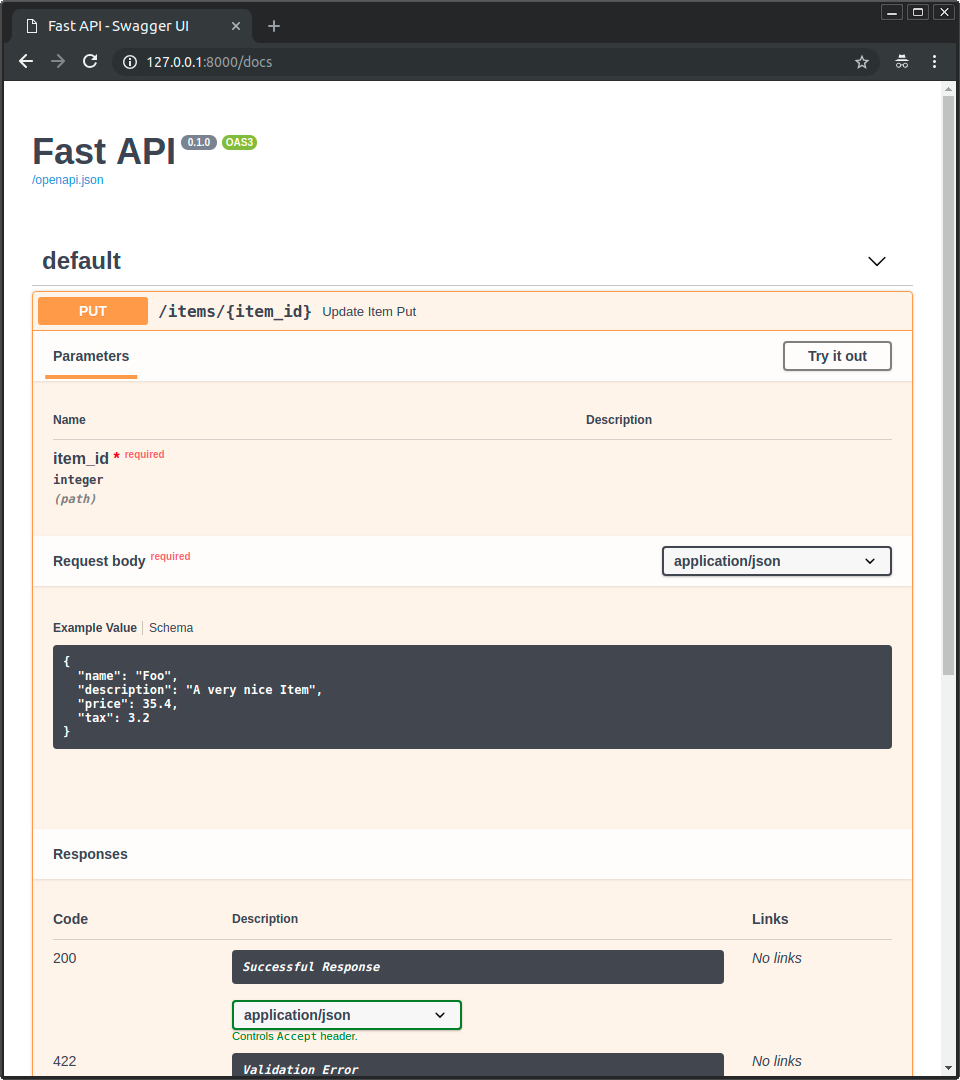
ドキュメントUIでの例
上記のいずれの方法でも、/docsの中では以下のようになります:
複数のexamplesを使うBody
もちろん、複数のexamplesを渡すこともできます:
from typing import Annotated

from fastapi import Body, FastAPI
from pydantic import BaseModel

app = FastAPI()


class Item(BaseModel):
    name: str
    description: str | None = None
    price: float
    tax: float | None = None


@app.put("/items/{item_id}")
async def update_item(
    *,
    item_id: int,
    item: Annotated[
        Item,
        Body(
            examples=[
                {
                    "name": "Foo",
                    "description": "A very nice Item",
                    "price": 35.4,
                    "tax": 3.2,
                },
                {
                    "name": "Bar",
                    "price": "35.4",
                },
                {
                    "name": "Baz",
                    "price": "thirty five point four",
                },
            ],
        ),
    ],
):
    results = {"item_id": item_id, "item": item}
    return results
🤓 Other versions and variants
from typing import Annotated, Union

from fastapi import Body, FastAPI
from pydantic import BaseModel

app = FastAPI()


class Item(BaseModel):
    name: str
    description: Union[str, None] = None
    price: float
    tax: Union[float, None] = None


@app.put("/items/{item_id}")
async def update_item(
    *,
    item_id: int,
    item: Annotated[
        Item,
        Body(
            examples=[
                {
                    "name": "Foo",
                    "description": "A very nice Item",
                    "price": 35.4,
                    "tax": 3.2,
                },
                {
                    "name": "Bar",
                    "price": "35.4",
                },
                {
                    "name": "Baz",
                    "price": "thirty five point four",
                },
            ],
        ),
    ],
):
    results = {"item_id": item_id, "item": item}
    return results
Tip
Prefer to use the Annotated version if possible.
from fastapi import Body, FastAPI
from pydantic import BaseModel

app = FastAPI()


class Item(BaseModel):
    name: str
    description: str | None = None
    price: float
    tax: float | None = None


@app.put("/items/{item_id}")
async def update_item(
    *,
    item_id: int,
    item: Item = Body(
        examples=[
            {
                "name": "Foo",
                "description": "A very nice Item",
                "price": 35.4,
                "tax": 3.2,
            },
            {
                "name": "Bar",
                "price": "35.4",
            },
            {
                "name": "Baz",
                "price": "thirty five point four",
            },
        ],
    ),
):
    results = {"item_id": item_id, "item": item}
    return results
Tip
Prefer to use the Annotated version if possible.
from typing import Union

from fastapi import Body, FastAPI
from pydantic import BaseModel

app = FastAPI()


class Item(BaseModel):
    name: str
    description: Union[str, None] = None
    price: float
    tax: Union[float, None] = None


@app.put("/items/{item_id}")
async def update_item(
    *,
    item_id: int,
    item: Item = Body(
        examples=[
            {
                "name": "Foo",
                "description": "A very nice Item",
                "price": 35.4,
                "tax": 3.2,
            },
            {
                "name": "Bar",
                "price": "35.4",
            },
            {
                "name": "Baz",
                "price": "thirty five point four",
            },
        ],
    ),
):
    results = {"item_id": item_id, "item": item}
    return results
この場合、examplesはそのボディデータの内部JSON Schemaの一部になります。
それでも、執筆時点では、ドキュメントUIの表示を担当するツールであるSwagger UIは、JSON Schema内のデータに対して複数の例を表示することをサポートしていません。しかし、回避策については以下を読んでください。
OpenAPI固有のexamples
JSON Schemaがexamplesをサポートする前から、OpenAPIは同じくexamplesという別のフィールドをサポートしていました。
このOpenAPI固有のexamplesは、OpenAPI仕様の別のセクションに入ります。各JSON Schemaの中ではなく、各path operationの詳細に入ります。
そしてSwagger UIは、この特定のexamplesフィールドを以前からサポートしています。そのため、これを使ってドキュメントUIに異なる例を表示できます。
このOpenAPI固有フィールドexamplesの形は複数の例(listではなく)を持つdictであり、それぞれに追加情報が含まれ、その追加情報はOpenAPIにも追加されます。
これはOpenAPIに含まれる各JSON Schemaの中には入らず、外側の、path operationに直接入ります。
openapi_examplesパラメータの使用
FastAPIでは、以下に対してパラメータopenapi_examplesを使って、OpenAPI固有のexamplesを宣言できます:
Path()Query()Header()Cookie()Body()Form()File()
dictのキーは各例を識別し、各値は別のdictです。
examples内の各特定の例dictには、次の内容を含められます:
summary: 例の短い説明。description: Markdownテキストを含められる長い説明。value: 実際に表示される例(例:dict)。externalValue:valueの代替で、例を指すURLです。ただし、valueほど多くのツールでサポートされていない可能性があります。
次のように使えます:
from typing import Annotated

from fastapi import Body, FastAPI
from pydantic import BaseModel

app = FastAPI()


class Item(BaseModel):
    name: str
    description: str | None = None
    price: float
    tax: float | None = None


@app.put("/items/{item_id}")
async def update_item(
    *,
    item_id: int,
    item: Annotated[
        Item,
        Body(
            openapi_examples={
                "normal": {
                    "summary": "A normal example",
                    "description": "A **normal** item works correctly.",
                    "value": {
                        "name": "Foo",
                        "description": "A very nice Item",
                        "price": 35.4,
                        "tax": 3.2,
                    },
                },
                "converted": {
                    "summary": "An example with converted data",
                    "description": "FastAPI can convert price `strings` to actual `numbers` automatically",
                    "value": {
                        "name": "Bar",
                        "price": "35.4",
                    },
                },
                "invalid": {
                    "summary": "Invalid data is rejected with an error",
                    "value": {
                        "name": "Baz",
                        "price": "thirty five point four",
                    },
                },
            },
        ),
    ],
):
    results = {"item_id": item_id, "item": item}
    return results
🤓 Other versions and variants
from typing import Annotated, Union

from fastapi import Body, FastAPI
from pydantic import BaseModel

app = FastAPI()


class Item(BaseModel):
    name: str
    description: Union[str, None] = None
    price: float
    tax: Union[float, None] = None


@app.put("/items/{item_id}")
async def update_item(
    *,
    item_id: int,
    item: Annotated[
        Item,
        Body(
            openapi_examples={
                "normal": {
                    "summary": "A normal example",
                    "description": "A **normal** item works correctly.",
                    "value": {
                        "name": "Foo",
                        "description": "A very nice Item",
                        "price": 35.4,
                        "tax": 3.2,
                    },
                },
                "converted": {
                    "summary": "An example with converted data",
                    "description": "FastAPI can convert price `strings` to actual `numbers` automatically",
                    "value": {
                        "name": "Bar",
                        "price": "35.4",
                    },
                },
                "invalid": {
                    "summary": "Invalid data is rejected with an error",
                    "value": {
                        "name": "Baz",
                        "price": "thirty five point four",
                    },
                },
            },
        ),
    ],
):
    results = {"item_id": item_id, "item": item}
    return results
Tip
Prefer to use the Annotated version if possible.
from fastapi import Body, FastAPI
from pydantic import BaseModel

app = FastAPI()


class Item(BaseModel):
    name: str
    description: str | None = None
    price: float
    tax: float | None = None


@app.put("/items/{item_id}")
async def update_item(
    *,
    item_id: int,
    item: Item = Body(
        openapi_examples={
            "normal": {
                "summary": "A normal example",
                "description": "A **normal** item works correctly.",
                "value": {
                    "name": "Foo",
                    "description": "A very nice Item",
                    "price": 35.4,
                    "tax": 3.2,
                },
            },
            "converted": {
                "summary": "An example with converted data",
                "description": "FastAPI can convert price `strings` to actual `numbers` automatically",
                "value": {
                    "name": "Bar",
                    "price": "35.4",
                },
            },
            "invalid": {
                "summary": "Invalid data is rejected with an error",
                "value": {
                    "name": "Baz",
                    "price": "thirty five point four",
                },
            },
        },
    ),
):
    results = {"item_id": item_id, "item": item}
    return results
Tip
Prefer to use the Annotated version if possible.
from typing import Union

from fastapi import Body, FastAPI
from pydantic import BaseModel

app = FastAPI()


class Item(BaseModel):
    name: str
    description: Union[str, None] = None
    price: float
    tax: Union[float, None] = None


@app.put("/items/{item_id}")
async def update_item(
    *,
    item_id: int,
    item: Item = Body(
        openapi_examples={
            "normal": {
                "summary": "A normal example",
                "description": "A **normal** item works correctly.",
                "value": {
                    "name": "Foo",
                    "description": "A very nice Item",
                    "price": 35.4,
                    "tax": 3.2,
                },
            },
            "converted": {
                "summary": "An example with converted data",
                "description": "FastAPI can convert price `strings` to actual `numbers` automatically",
                "value": {
                    "name": "Bar",
                    "price": "35.4",
                },
            },
            "invalid": {
                "summary": "Invalid data is rejected with an error",
                "value": {
                    "name": "Baz",
                    "price": "thirty five point four",
                },
            },
        },
    ),
):
    results = {"item_id": item_id, "item": item}
    return results
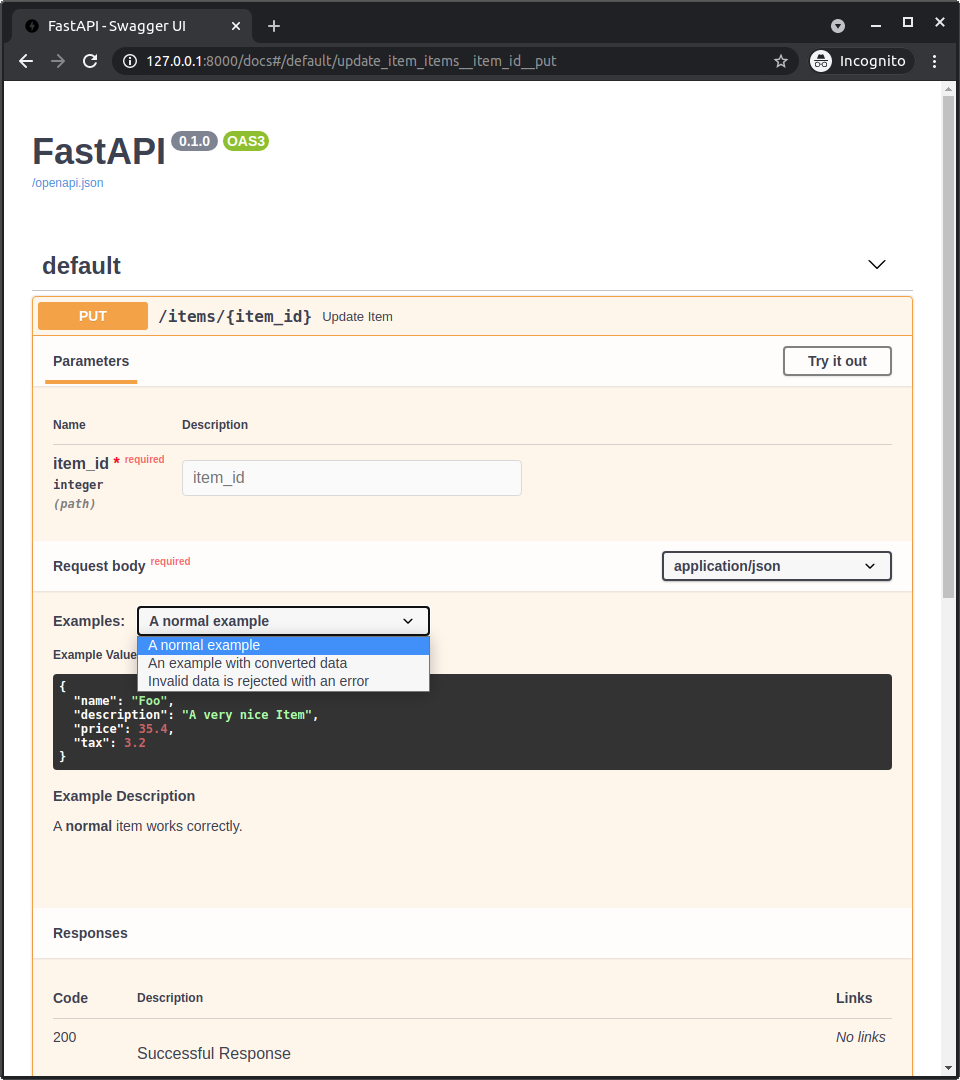
ドキュメントUIのOpenAPI Examples
Body()にopenapi_examplesを追加すると、/docsは次のようになります:
技術詳細
豆知識
すでにFastAPIバージョン0.99.0以上を使用している場合、おそらくこれらの詳細はスキップできます。
これらは、OpenAPI 3.1.0が利用可能になる前の古いバージョンにより関連します。
これは簡単なOpenAPIとJSON Schemaの歴史の授業だと考えられます。🤓
注意
ここでは、標準であるJSON SchemaとOpenAPIについての非常に技術的な詳細を扱います。
上のアイデアがすでにうまく動いているなら、それで十分かもしれませんし、おそらくこの詳細は不要です。気軽にスキップしてください。
OpenAPI 3.1.0より前は、OpenAPIは古く改変されたバージョンのJSON Schemaを使用していました。
JSON Schemaにはexamplesがなかったため、OpenAPIは自身が改変したバージョンに独自のexampleフィールドを追加しました。
OpenAPIは、仕様の他の部分にもexampleとexamplesフィールドを追加しました:
Parameter Object(仕様内)。FastAPIの以下で使用されました:Path()Query()Header()Cookie()
Request Body Object。仕様内のMedia Type Objectのcontentフィールド(仕様内)。FastAPIの以下で使用されました:Body()File()Form()
情報
この古いOpenAPI固有のexamplesパラメータは、FastAPI 0.103.0以降はopenapi_examplesになりました。
JSON Schemaのexamplesフィールド
しかしその後、JSON Schemaは新しいバージョンの仕様にexamplesフィールドを追加しました。
そして、新しいOpenAPI 3.1.0は、この新しいフィールドexamplesを含む最新バージョン(JSON Schema 2020-12)に基づくようになりました。
そして現在、この新しいexamplesフィールドは、古い単一(かつカスタム)のexampleフィールドより優先され、exampleは現在非推奨です。
JSON Schemaのこの新しいexamplesフィールドは、OpenAPIの他の場所(上で説明)にあるような追加メタデータを持つdictではなく、単なる例のlistです。
情報
OpenAPI 3.1.0がこのJSON Schemaとの新しいよりシンプルな統合とともにリリースされた後も、しばらくの間、自動ドキュメントを提供するツールであるSwagger UIはOpenAPI 3.1.0をサポートしていませんでした(バージョン5.0.0からサポートされています🎉)。
そのため、FastAPI 0.99.0より前のバージョンは、OpenAPI 3.1.0より低いバージョンのOpenAPIをまだ使用していました。
PydanticとFastAPIのexamples
Pydanticモデル内で、schema_extraまたはField(examples=["something"])を使ってexamplesを追加すると、その例はそのPydanticモデルのJSON Schemaに追加されます。
そしてそのPydanticモデルのJSON SchemaはAPIのOpenAPIに含まれ、ドキュメントUIで使用されます。
FastAPI 0.99.0より前のバージョン(0.99.0以上は新しいOpenAPI 3.1.0を使用)では、他のユーティリティ(Query()、Body()など)でexampleまたはexamplesを使っても、それらの例はそのデータを説明するJSON Schema(OpenAPI独自版のJSON Schemaでさえ)には追加されず、OpenAPI内のpath operation宣言に直接追加されていました(JSON Schemaを使用するOpenAPIの部分の外側)。
しかし、FastAPI 0.99.0以上ではOpenAPI 3.1.0を使用し、それはJSON Schema 2020-12とSwagger UI 5.0.0以上を使うため、すべてがより一貫し、例はJSON Schemaに含まれます。
Swagger UIとOpenAPI固有のexamples
Swagger UIは複数のJSON Schema examplesをサポートしていなかった(2023-08-26時点)ため、ユーザーはドキュメントで複数の例を表示する手段がありませんでした。
それを解決するため、FastAPI 0.103.0は、新しいパラメータopenapi_examplesで、同じ古いOpenAPI固有のexamplesフィールドを宣言するためのサポートを追加しました。🤓
まとめ
昔は歴史があまり好きではないと言っていました...が、今の私は「技術の歴史」の授業をしています。😅
要するに、FastAPI 0.99.0以上にアップグレードしてください。そうすれば、物事はもっとシンプルで一貫性があり直感的になり、これらの歴史的詳細を知る必要もありません。😎